

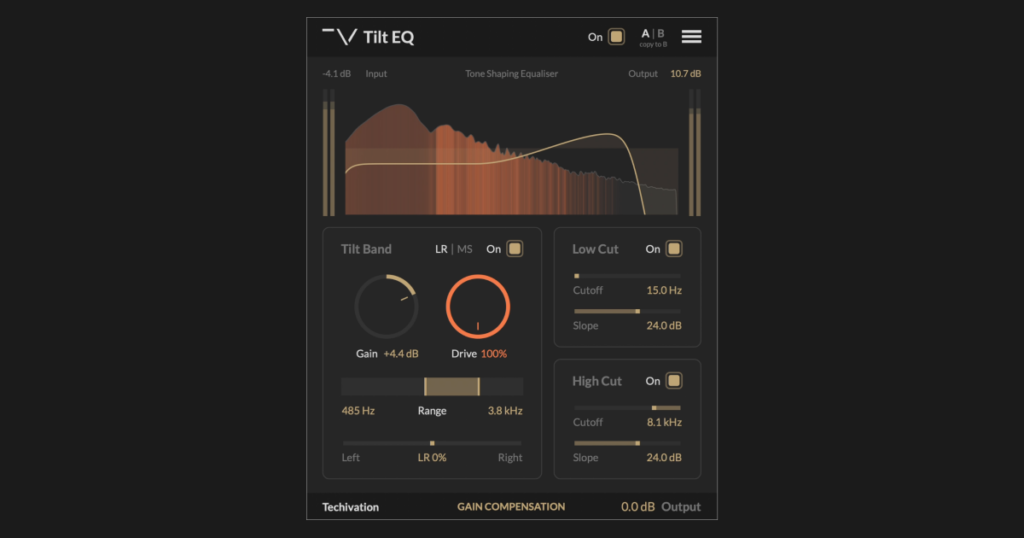
Techivation has released Tilt EQ for free — a tone-shaping EQ that lets you push a mix toward bright/clear or warm/dark with one simple tilt control, then pour the energy you’ve cut back into the signal as harmonic saturation rather than throwing it away. The result is a clean tonal correction that doesn’t leave the source feeling thin or lifeless.
How the tilt + drive design works
Tilt EQ is a single-band tilt with a unique Drive control. Push Tilt Gain up and the high end opens up, brightness and clarity come forward; push it down and the signal warms up, top end darkens. The Drive parameter then re-injects the energy that was cut on the attenuated side as harmonic content — so a darkening tilt doesn’t sound dull, and a brightening tilt doesn’t sound thin. Range and slope are tunable, the Tilt Band can run in LR or M/S mode, and an EQ Curve Display visualizes the resulting response in gold.
Feature highlights
- Tilt Band Gain — controls how much spectral tilt is applied
- Tilt Band Drive — controls the amount of harmonic saturation re-introduced on the attenuated side
- Tilt Band Range — sets the frequency range over which the boost-to-cut transition happens, controlling tilt position and slope
- Tilt Band LR / MS — switch between left/right and mid/side processing
- Tilt Band Stereo Balance — pan the band’s effect across the stereo field
- Filter controls — Low Cut and High Cut filters to clean up unwanted frequencies
- Gain Compensation — fixed loudness compensation based on the EQ curve
- Drive Quality — oversampling for the Drive stage at Standard (1×), Good (2×), Great (4×), or Ultra (8×)
- EQ Curve Display — visualizes the total spectral adjustment as a gold curve
- Output — clean make-up gain on the processed signal
How to install
Sign up for a Techivation account, install Techivation Manager, and grab Tilt EQ from inside the Manager once you’re signed in. The Manager handles installation and updates for all Techivation products in one place.