

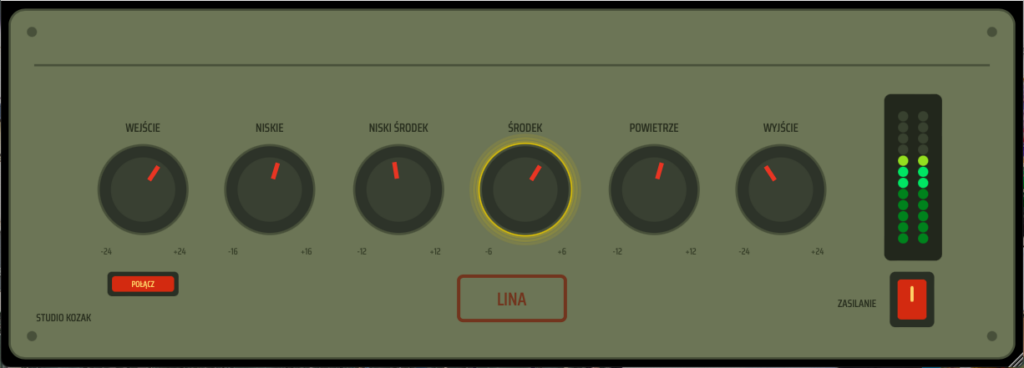
“LINA,” an EQ plugin developed by Studio Kozak that’s perfect for adding tone and color, is currently available for free!
In this article, we introduce the distribution details and an overview of LINA.
Please use it as a reference.
What Is Studio Kozak “LINA”?
LINA is a fixed-voicing tube equalizer designed for tone, color, and musicality. Inspired by the legend of a forgotten Polish engineer, it intentionally takes a different approach from modern surgical EQs. The frequencies are fixed and the controls are simple. Transparency is not the goal; instead, it is designed for situations where you want to add character, warmth, and personality. Under the hood, it combines carefully tuned EQ curves with tube-style saturation, dynamic bias behavior, power supply sag simulation, and 4x oversampling processing.
Key Features
- Fixed-frequency tube equalizer
- Tube-style saturation
- Dynamic bias behavior
- Power supply sag simulation
- 4x oversampling processing
- Auto-gain system and Input/Output link function
- VST3 for Windows and macOS, and Audio Unit for macOS
How to Download and Install LINA
You can use it by accessing the official GitHub page, downloading the distributed plugin file, and moving it to the plugin folder of your environment.
Windows
- VST folder: C:\Program Files\VSTPlugins
- VST3 folder: C:\Program Files\Common Files\VST3
macOS
- VST folder: Macintosh HD/Library/Audio/Plug-ins/VST/
- VST3 folder: Macintosh HD/Library/Audio/Plug-ins/VST3/
- AU folder: Macintosh HD/Library/Audio/Plug-ins/Components/
That’s the free distribution information for LINA.