

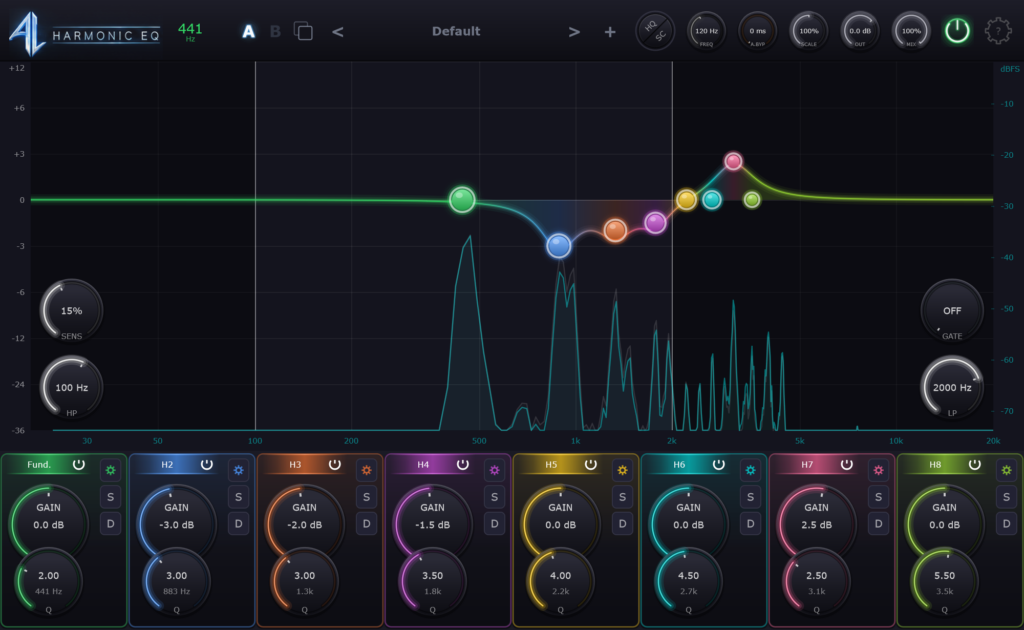
Aeons Light’s tracking harmonic EQ plugin “Harmonic EQ” is now available as a free download.
In this article, we cover the download details and an overview of Harmonic EQ. Be sure to check it out.
1. What Is Aeons Light “Harmonic EQ”?
Harmonic EQ is an EQ plugin that automatically detects the fundamental of an audio signal, places EQ bands on its harmonics, and follows pitch changes in real time so you can adjust individual harmonics. Even when the pitch of a vocal, bass or melody moves, the EQ keeps hitting the harmonics you are targeting without any frequency automation.
The free version includes all audio features and has no expiration. However, the free version shows a 10-second countdown screen when you first open the plugin. Once the countdown ends you can use it as normal, and purchasing the lifetime license (normally $50) removes this screen. Buying the license does not add any extra EQ features.
Key Features
- Bands follow the fundamental and harmonic series, applying EQ in real time as the pitch changes
- 8 independent bands. Assign harmonics (x2 to x48), subharmonics, musical intervals, or custom multipliers
- Band types: bell, shelf, notch, high-pass and low-pass (6 / 12 / 18 / 24 / 48 dB/oct)
- Dynamic mode: per-band threshold applies EQ only when a harmonic exceeds the set level
- Pre/post FFT spectrum analyzer (supports dragging nodes)
- Solo function lets you listen to individual harmonics to isolate formants and hidden overtones
- Pitch detection can use audio, MIDI notes or sidechain input, plus a Frequency Lock to fix the frequency manually
- Detector Gate prevents the EQ from wrongly tracking quiet sounds or room noise
- Pitch detection range of 20 to 5000 Hz, sensitivity control, auto-bypass, and Dry/Wet (0 to 200%)
- 75 factory presets for vocals, guitar, bass, drums and creative processing
- Version: 1.1.3
- Supported formats: Windows VST3 / CLAP, macOS VST3 / CLAP / AU, Linux VST3 / CLAP
- System requirements: Windows 10 or later (64-bit), macOS 11 or later (Intel and Apple Silicon), Ubuntu 22.04 or later or an equivalent Linux distribution (64-bit)
Samples used in the video: Splice Sounds
2. How to Download and Install Harmonic EQ
Open the download page via “Download Free” on the official page, then choose your OS (Windows, macOS, etc.) to download the installer.
That is all for the Harmonic EQ free download information. Be sure to check it out and add it to your plugin collection.