

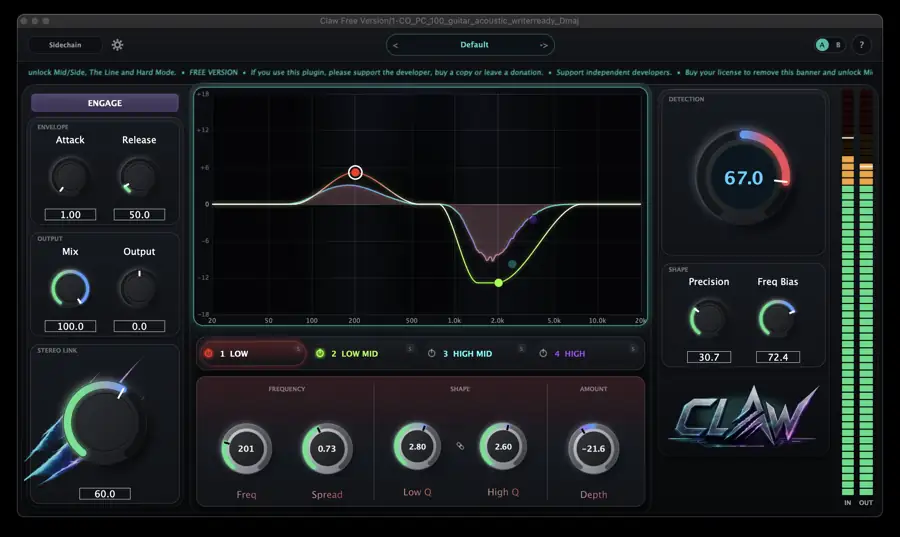
Side Key System is giving away Claw Smart Eq Free, the free edition of its spectral resonance suppressor plugin.
In this article we cover what Claw Smart Eq does, its main features, and how to grab the free version.
1. What Is Side Key System Claw Smart Eq?
Claw Smart Eq is a spectral resonance suppressor that detects only the resonances actually ringing inside your mix and clamps them down, leaving every other frequency completely untouched. Instead of drawing a static EQ curve, you place a point on the spectrum and spread it out into a low-side and high-side bracket to create a “target zone”. Claw monitors that zone continuously and steps in only at the exact moment a resonance appears – harsh vocal sibilance, a boxy snare, piercing cymbals, guitar string resonance – then backs off the instant it settles. The free version, Claw Free, is not a cut-down demo: it runs the exact same resonance detection engine as the paid Claw.
Key Features
- 4 independent target zones (each with Depth, Spread, Low Q and High Q)
- A single Detection dial that scales all zones together
- Anti-masking via sidechain input (detect resonances on one signal, apply the correction to another)
- Three quality modes – Eco / Normal / High – adjusting CPU load and analysis resolution while latency stays fixed
- A/B comparison to switch between two states of every parameter with one click
- Factory presets and UI scaling
- Differences from the paid version: Mid/Side processing (independent zones per channel), a Hard mode for deeper correction, and the full-band fallback correction “The Line” are exclusive to the paid version. The free version also shows a small support banner inside the plugin.
- Buying a license unlocks Mid/Side, Hard mode and The Line and removes the banner (same installer, your settings carry over)
2. How to Install and Activate Claw Smart Eq
Enter “0” in the price field on the official Gumroad page and you can download it for free. Move the downloaded plugin file into a folder your DAW scans. On first launch you will need to enter your email address and the license key shown after checkout.
Windows
- VST folder: C:\Program Files\VSTPlugins
- VST3 folder: C:\Program Files\Common Files\VST3
macOS
- VST folder: Macintosh HD/Library/Audio/Plug-ins/VST/
- VST3 folder: Macintosh HD/Library/Audio/Plug-ins/VST3/
- AU folder: Macintosh HD/Library/Audio/Plug-ins/Components/
Conclusion
That is everything on the free giveaway of Claw Smart Eq. A dynamic resonance suppressor with four target zones and sidechain-based anti-masking is a serious addition to any mixing chain, and getting the same detection engine as the paid version for free makes it well worth grabbing.