

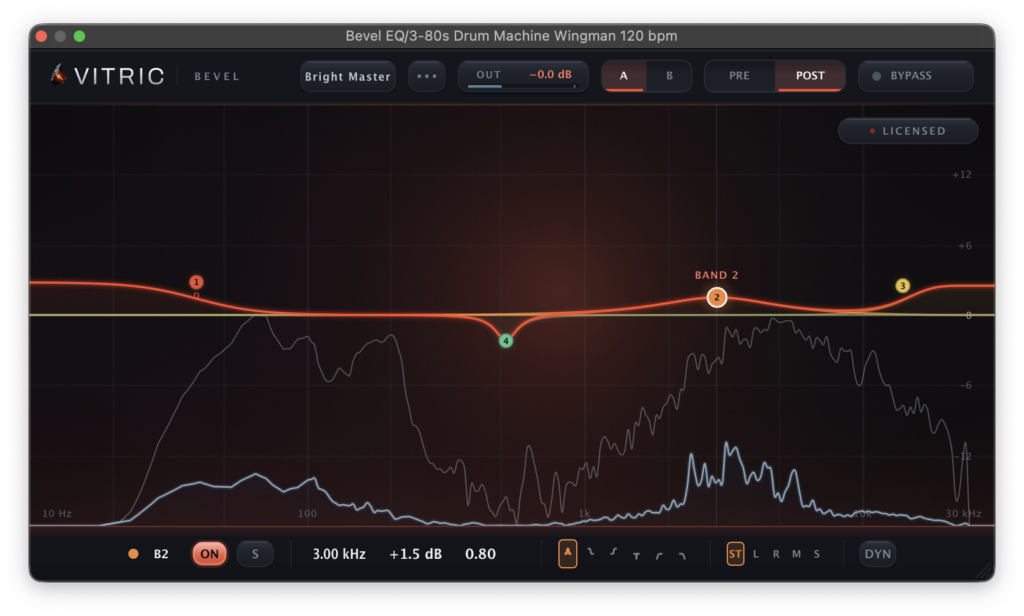
Vitric Audio is giving away Bevel EQ, its brand-new equalizer plugin, completely free for a limited time.
In this article we cover the details of the giveaway along with an overview of what Bevel EQ can do.
What Is Vitric Audio Bevel EQ?
Bevel EQ is a 24-band freeform parametric EQ that brings per-band channel placement (Stereo / Left / Right / Mid / Side), dynamic behavior for bell and shelf bands, selectable filter slopes and pre/post analyzer displays together on a single curve.
Double-clicking the display creates a band, and you can adjust it by dragging the node or by typing values directly into the floating control bar. Every slot can act as a bell, shelf, notch, high-pass or low-pass filter, with cut slopes selectable from 12 dB/oct all the way up to 96 dB/oct.
Bevel EQ normally sells for $30, but during the launch sale you can grab it for free.
Key Features
- 24-band freeform parametric EQ
- Every slot can be used as a bell, shelf, notch, high-pass or low-pass filter, with cut slopes from 12 to 96 dB/oct
- Bell and shelf bands can each be given their own threshold, signed range, attack and release for dynamic behavior
- Each detector listens to the band around itself rather than the full signal, so a dynamic band at 6 kHz can tame sibilance without reacting to low-end energy
- Every band can process Stereo / Left / Right / Mid / Side independently, letting you lift only the high band on one side or cut a build-up in the center low-mids without opening multiple EQ instances
- Built-in analyzer showing pre- and post-processing spectrum, with adjustable resolution, tilt, speed and range, plus freeze, peak hold and per-band solo
- Proportional Q, auto gain, A/B snapshots, undo/redo, 9 presets and a 20-500 Hz mono maker
- Zero latency by default; when 2x or 4x oversampling is selected the plugin reports latency to the host
How to Download and Install Bevel EQ
Head to the official product page and check out for $0 via the “GET BEVEL EQ FREE” button. You will then receive an email containing the license key along with installation and activation instructions. No account creation is required.
Installation
- Download the installer for your platform from the Vitric Audio downloads page. Depending on your system, VST3 and AU, or AAX, will be installed.
- Run the installer. If your DAW does not pick up the plugin automatically, trigger a plugin rescan from within your DAW.
Activation
- Launch the plugin and click the license panel.
- Paste the license key you received by email. If your machine is online, that is all you need to do.
- On an offline machine, visit the Vitric Audio license page, enter your license key together with the machine code shown in the plugin, and download the license file.
Free (limited time) – Vitric Audio “Bevel EQ”: a 24-band parametric EQ with dynamic band behavior.
That wraps up the Bevel EQ giveaway. A 24-band dynamic EQ with full Mid/Side control for free is a serious addition to any mixing template, so make sure you grab it before the launch promotion ends.