

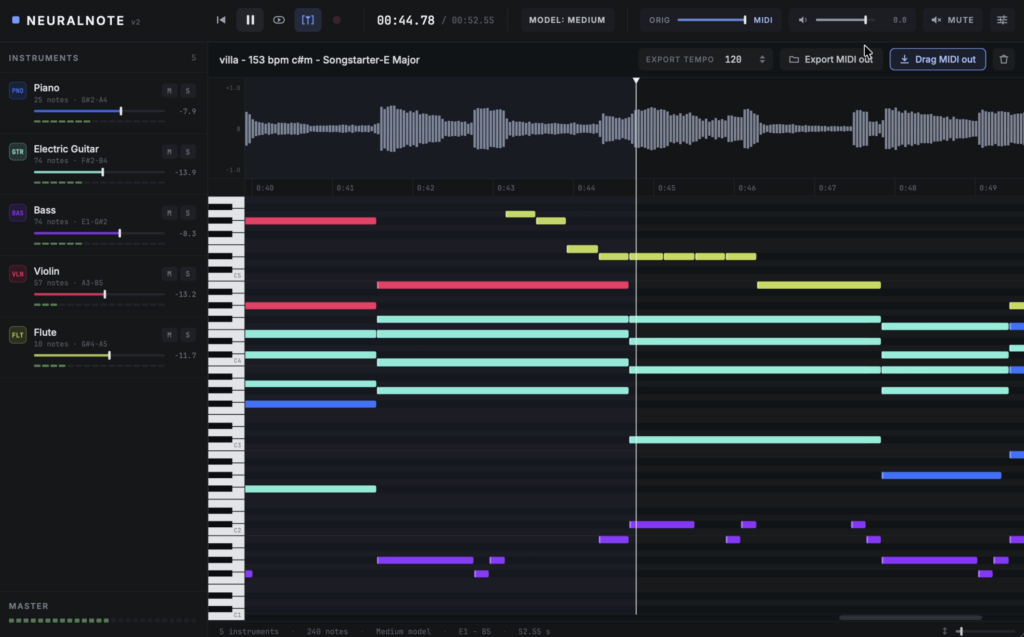
DamRsn’s NeuralNote v2, a mix-to-MIDI conversion plugin and standalone app, is now available as a free download! This article covers the download details and an overview of NeuralNote v2.
What Is DamRsn NeuralNote v2?
NeuralNote v2 is an audio-to-MIDI plugin and standalone app that transcribes the notes of each instrument from a full-mix recording and exports them as MIDI. Version 2.0.0, released on October 4, 2026, is a major rewrite that replaces Spotify’s Basic Pitch with “MuScriptor”, a larger transcription model from Kyutai and Mirelo. It also adds a new UI and a built-in synth that can play back every transcribed instrument.
Key Features
- New transcription model “MuScriptor”: choose from three sizes – small, medium and large (about 210MB / 620MB / 2.7GB)
- Transcribe a full mix by instrument: specify which instruments to transcribe, or let the model detect them automatically
- Results appear while you wait: decoded notes show up progressively in the piano roll and can be played back before processing finishes
- Built-in synth: per-instrument gain, mute and solo, a mix between the original audio and the transcription, and a master gain
- Multi-instrument MIDI export: drag and drop into your DAW or save as a file (one track and General MIDI program per instrument, drums on channel 10)
- New resizable UI
- Transcription results are saved with your DAW session
- Runs entirely locally: your audio is never sent anywhere
- GPU or CPU processing: Metal on macOS, Vulkan on Windows and Linux, or CPU
- macOS (Apple Silicon): Standalone, VST3, AU
- Windows (x64): Standalone, VST3
- Removed from v1: transcription settings (note sensitivity, split sensitivity, minimum note length, pitch bend) and scale / time quantization
How to Download and Install NeuralNote v2
Download the macOS (Apple Silicon) or Windows (x64) version from the GitHub release page (v2.0.0) and run the installer. The macOS installer is signed and notarized, while the Windows version is not code-signed, so a warning may appear before you run it. Models are not included in the installer; the size you choose with the “Model” button in the top bar is downloaded on first launch.