
This article covers the latest sale information for the popular drum sample library Steven Slate Drums, its expansion packs, and the Steven Slate Trigger drum replacement tool. We also explain what Steven Slate Drums is and how to install and activate it. This page is updated whenever a new sale begins.
1. Latest Steven Slate Drums Sale
Steven Slate Drums is currently running the following sale.
Early Summer Sale: until June 30, 2026
- Steven Slate Drums 5.5 – an easy-to-use, popular drum library loaded with a wide variety of kits. $59 (expansion packs $49 each).
- Steven Slate Trigger 2 Platinum – a high-precision, multi-channel drum trigger. $59 (expansion packs $49 each).
2. What is Steven Slate Drums 5.5 (SSD 5.5)?
Steven Slate Drums (SSD) is a drum sample library from Steven Slate Audio, created by producer Steven Slate. For over 20 years its “industry-standard” drum sounds have been used on countless hit records. You can program them into your own tracks, or use them to replace and reinforce live drums. The current version is Steven Slate Drums 5.5 (SSD 5.5).
Three key points of SSD 5.5
- There is a free version you can use forever. A no-time-limit, full-feature SSD 5.5 demo is available, so you can try the sounds and workflow for free first (contents described below).
- Over 148 kits and over 2,400 grooves covering every genre. Rock, metal, hip-hop, country, electronic, pop, 70s, jazz – it works for any style.
- A sound that “sits in the mix” and is highly rated by pros. The sounds sit well in a track even without EQ or compression, and many producers behind hit-record mixes recommend it.
Main features
| Feature | Details |
|---|---|
| Kit Browser (148+ kits) | Preview over 148 drum kits, filtering by genre, artist, and sound character so you can quickly find the kit that fits your song. |
| MIDI Grooves (2,400+ grooves) | Over 2,400 MIDI grooves played by real drummers, covering every genre. Drag and drop them straight into your DAW. |
| Groove AI (AI-powered) | Analyzes your song, detects the important transients, and automatically suggests matching MIDI grooves. Fine-tune with the Morph knob and build your song with the Build lane, then move straight to the arrangement view. |
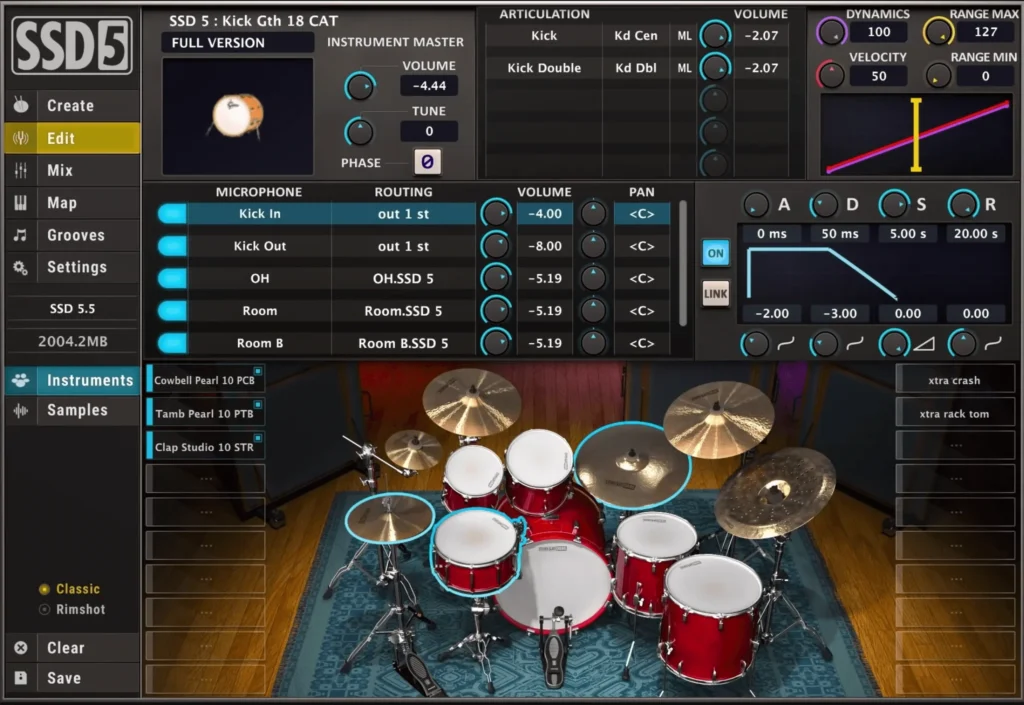
| Customization Panel | Freely control articulations, tuning, velocity, individual mics, and ADSR to dial in your sound down to the finest detail. |
| Mix Console (built-in mixer) | A studio-quality mixing tool is built in, letting you adjust volume, pan, and effects for each drum part. |
| Wide compatibility (DAW / e-drums) | Works in all major DAWs and supports major electronic drum kits, so you can use it for programming or live performance. |
What’s inside SSD 5.5 Free (free version)
A no-time-limit, full-feature free demo is distributed officially. It includes the following:
- One “Deluxe 2 Kit”
- The Classic (pre-mixed) Slate snare
- Three kit presets: Deluxe 2 Free / Hugo / Dry n’ Tight
System requirements & license
| Product name | Steven Slate Drums 5.5 (SSD 5.5) |
| Developer | Steven Slate Audio |
| Supported DAWs | All major DAWs |
| Electronic drums | Supports major electronic drum kits |
| System requirements (Mac) | Intel 2.2GHz dual-core or higher (Apple Silicon supported) / 4GB RAM or more |
| System requirements (PC) | Intel dual-core / AMD 2.2GHz or higher / 4GB RAM or more |
| Authorization | Can be authorized with a Machine ID via PACE License Manager (a physical iLok is optional, not required) |
| License count | 3 iLok licenses per purchase (install on up to 3 machines) |
| Guarantee | 30-day money-back guarantee / instant download after purchase |
3. How to install and activate
Here is how to install and authorize SSD 5.5. There is also an official installation video, so use it as a reference.
Creating an account
- From the top right of the official page, go to “ACCOUNT” → “SIGN UP” to register an account.
- Enter your email address and your password twice, then fill in First Name, Last Name, Country, and Zip Code (Company can be left blank).
- Click “VERIFY YOUR ACCOUNT” in the email you receive.
- You can now log in any time from “ACCOUNT” at the top right of the official page.
Installation and activation
- From “ACCOUNT” you can see your own products. If you bought the paid version, enter your serial number from “Add Products”.
- The paid version requires an iLok account. Enter your iLok ID; an email will be sent to the address registered with iLok, so enter the “Verification Code” it contains. Then activate in iLok License Manager to finish the iLok setup.
- Select SSD 5.5 or SSD 5.5 FREE and download the INSTALLER for Mac or Windows.
- Launch the INSTALLER and sign in with the account you registered. Then choose the product and install it, selecting a folder in which to store the SSD5 Library Folder.
- In your DAW, launch the Steven Slate “SSDSampler5” plugin.
- If the library does not load correctly, or after adding an expansion pack, open the “Settings” section and choose the folder where you saved the SSD5 Library Folder from “Select Base Dir,” then click the refresh icon at the top.