

UVI’s creative filter/EQ plugin “Shade” is on sale now! The sale runs until October 31, 2026.
In this article, we cover the latest Shade sale information, an overview of the plugin, and how to install and activate UVI products.
This article will be updated whenever a new sale starts.
1. Latest Shade Sale Information
Shade is currently on sale as follows.
Shade Sale: Until October 31, 2026
UVI Shade: a creative EQ that lets you freely combine 35 filter types and 10 modulators. Check the current price on Plugin Boutique.
2. What Is UVI Shade?
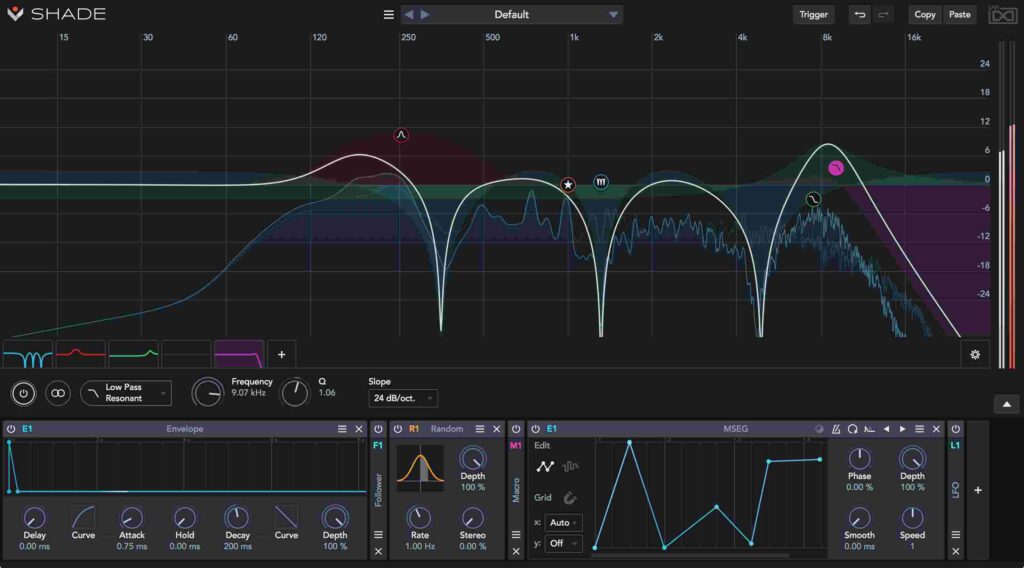
Shade is a next-generation filtering tool that goes beyond conventional EQs, filters and modulation. It features 35 filter shapes and 10 modulators, and its flexible semi-modular, drag-and-drop structure makes complex, creative sound design intuitive.
Designed as a creative effect environment that breathes new life into your sound rather than a simple EQ, it handles everything from track processing to dynamic EQ, multiband compression, phaser/flanger-style modulation and pitch tracking.
The filters cover everything from digital to analog modeling, with slopes up to 2000 dB/oct and Q control offering flexibility that is rare in the industry. It also delivers high-quality, zero-latency processing and fully fits modern DAW workflows. Simple on the surface but surprisingly powerful inside, it adapts to any genre and production style.
Key Features
- 35 filter shapes: from digital and analog-modeled to multi-resonance types
- 10 modulators: LFO, envelope, MSEG, XY pad, follower, pitch tracking and more
- Semi-modular structure: flexible routing with drag and drop
- Dynamic EQ and modulation: add dynamic control to any parameter
- Ultra-precise, zero-latency processing: lightweight and real-time even with analog-matched processing
- Multichannel and M/S support: flexible for surround and stereo setups
- Independent filter Q adjustment: Q-Up / Q-Down for anything from smooth to extreme processing
- Version 1.2 features: pitch tracking, 20 new presets, UI improvements and more
3. How to Install and Activate UVI Products
Authorizing UVI products requires an iLok account. (A physical USB iLok is not required.)
- Create an account on the UVI website
- Download, install and log in to UVI Portal
- Enter your serial number and iLok User ID under Redeem Serial in UVI Portal
- Install the product in UVI Portal
- Activate it with iLok License Manager
Note: Products that run in UVI Workstation require UVI Workstation to be installed as well.