

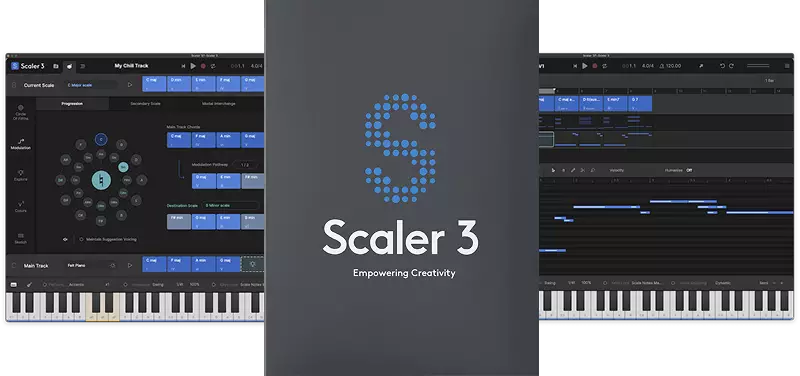
The sale on “Scaler 3,” the latest version of the popular chord progression software, is now running!
This article covers the latest Scaler 3 sale information, an overview of the software, and how to install and activate it.
This article is updated whenever a new sale starts.
Scaler 3 Latest Sale Information
Scaler 3 is currently on sale.
Black Friday Sale: Until December 7, 2026
- Scaler Music “Scaler 3”: a chord creation tool that moves your songwriting forward with chord progression suggestions and a visualization of music theory. Upgrade pricing is also available. Check the current price on Plugin Boutique.
- Scaler Music “Scaler Detector” (free): a songwriting support tool that detects chords from audio and MIDI and suggests chords that fit
What Is Plugin Boutique “Scaler 3”? Differences from Scaler 2
Songwriting Support | Music Theory Workstation
Scaler 3 is a music theory workstation that makes harmony, composition and music theory visible, so you can turn ideas into finished songs quickly.
From your first chord progression to elaborate key changes, you can create chord progressions, generate melodies and basslines, build song structures and play your own instruments, all within Scaler 3. Because you can see the harmonies, scales and relationships between chords as you work, your understanding of music theory naturally deepens too.
What You Can Do with Scaler 3
- Songwriting: the chord suggestion feature helps you build richer chord progressions, find new ideas and get out of a rut
- Film and visual media music: explore advanced harmony, emotional key changes and progressions for orchestra
- Learn as you create: work while seeing the relationships between harmony, scales and chords, and naturally deepen your understanding of music
- Production and performance: generate melodies, basslines and performance phrases, arrange entire songs, and play your favorite instruments inside your DAW
Creating Chord Progressions
- Build progressions by drag and drop: choose and arrange chords from hundreds of chord sets organized by artist, genre and mood, and the parent scales that fit those chords are displayed. It can also suggest chords you can use next
- More than 1,000 chord sets, keys and modes: includes artist sets from Carl Cox, MJ Cole and The Temper Trap, and covers a wide range of genres from chill and drum and bass to jazz, cinematic, pop and metal
- Automatic voice leading: automatically adjusts chords so they connect smoothly
- Voice Grouping and a wide variety of voicings: drop voicings, guitar voicings, and shaping chords to fit a range
- Sketch Pad: place and compare up to seven chord progressions
- Chord, key and scale detection: detect from MIDI or audio and find chords that suit the song
Expanding Your Harmonic Options
- Explore page: suggests chords not tied to a specific scale, by genre and by mood such as dark, bright and neutral. Find everything from compatible progressions to adventurous ones
- Colors page: widen the range of usable chords with substitute chords, inversions, tensions, variations and parallel/negative harmony
- Circle of fifths: explore related harmonic options such as substitute chords and tensions
- Key change route suggestions: choose a destination scale from your current progression and get multiple suggestions for modulating to it. Secondary scale, modal interchange, mediant and neo-Riemannian modulation methods are also available
Generating Melodies and Basslines
- Motions: a library created by musicians that turns chords into melodies, arpeggios, basslines and phrases. Mood-based tags make them easy to find
- Combine multiple Motions: place different types of Motions on multiple tracks, move them freely and audition them to build arrangements that layer melody, bass, arpeggio and phrases
- Bass Follow Track: automatically generates a bassline that follows the root notes of the chord progression
- Divisi: finely control how chord voices are distributed, and send the upper and lower notes to separate Scaler instances for realistic ensembles and thick layering
Building Song Structure
- Multi-lane timeline: the Arrange page has dedicated lanes for chords, melody, bass and phrases, all synced to the main chord track. Clips can be adjusted per lane and per clip
- Scenes: create, duplicate and reorder chord variations and song sections to build the structure of the whole song quickly. You can also play each Scene to try different ideas
- Note editing matrix: customize and create Motions. MIDI lanes can either follow the chord track or run independently
- Harmonic Modifiers and Motion Controls: adjust range, note density, pitch and clip rotation within the selected scale
- Piano roll editing: edit performances with transpose, density, range and variation modifiers
Playing and Recording
- Bind to Keyboard: play chords, melodies and arpeggios with one finger from a MIDI keyboard
- Multi-Bind: loop multiple tracks together at the same time. Move between parts and audition them individually by muting lanes, useful for live performance, jamming and brainstorming
- User Track: record melodies and chords directly into Scaler’s piano roll. Chord-trigger and Keys Lock performances are also recorded as editable MIDI, so you can fix them while following the harmonic guide
Working with Instruments and Your DAW
- VST/AU hosting: load third-party instruments and effects directly into chord tracks and MIDI lanes. Supports both MIDI effects and audio effects
- 50 built-in sounds: play your progressions with piano, synths, orchestral instruments and more
- External MIDI Out: send chords, melodies, Scenes and performances to external instruments and plugins
- Live Sync: sync chords between multiple Scaler 3 instances to keep progressions aligned across the whole project
- DAW sync: follow your DAW’s playback position, tempo and time signature, or run independently with Scaler’s own cycle feature
- Standalone: use it without opening a DAW
- iPad version integration: continue ideas made on the iPad in Scaler 3 on desktop (the iPad version is sold separately)
- Onboarding tutorial: learn the controls step by step
Scaler Detector Included
When you newly purchase Scaler 3, “Scaler Detector,” which detects keys, scales and chords from audio and MIDI, is included. It works both standalone and as a plugin.
- Analyzes whole songs, loops, live performances and individual instrument tracks in real time
- Just drag and drop audio or MIDI files to analyze them
- Shows detected chords, notes and scales on an interactive keyboard
- Scale White Keys: assigns the white keys of your MIDI keyboard to the notes of the selected scale so you can play without hitting wrong notes
- With Bind to Keyboard and Voice Grouping, play the detected chords as they are or try different voicings
Main Changes from Scaler 2
- Timeline on the Arrange page: a timeline-style layout with dedicated lanes for chords, melody, bass and phrases
- Reorganized as Motions: the former Phrases, Performances, Melodies and Basslines are now combined into Motions, searchable with mood-based tags
- Hundreds of added Motions: new Motions created by professional musicians are added, along with a new “Passages” Motion
- Added Harmonic Modifiers and Motion Controls: adjust range, density, pitch and clip rotation within the scale
Installation and Activation
- Create an account: https://scalermusic.com/redeem/
- Open the email you receive and activate your account (also check your spam folder)
- Once activated, log in with your email address and password
- After logging in, click “Redeem”
- Enter the “Redeem code” from My Account on Plugin Boutique and press “Go”
- Download and install from “My Products”
- Launch it and activate with your serial number
That covers the latest Scaler 3 sale information.