

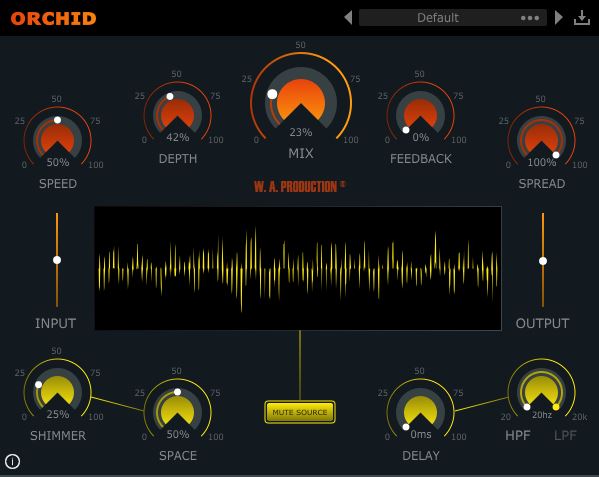


W. A. Production is giving away their chorus plugin “Orchid” for a limited time, completely free.
This article walks through the giveaway details and an overview of Orchid.
1. What is W. A. Production “Orchid”?
Orchid is a creative chorus plugin inspired by the rich, lustrous studio processing of the 1980s. It runs four chorus engines in parallel as a 4-way chorus processor, turning thin, weak sounds into thick, three-dimensional textures in an instant. It adds depth, richness, and harmonic structure to synths, basses, guitars, vocals, drums, and more. In addition to the standard Speed and Depth controls, it combines reverb, delay, shimmer, spread, and filtering into the feedback path, letting you push the sound all the way into phaser and comb-filter territory.
Key Features
- 4-way chorus processing that runs and mixes four parallel chorus voices
- Core parameters: Speed / Depth / Feedback / Spread
- Shimmer effect that generates up to two octaves above the source and adds sparkle with a slow phasing effect
- Space dial that adds reverb individually to each of the four chorus engines
- Delay of up to 100 ms
- Built-in High Pass / Low Pass filters
- Mix control useful for parallel processing
- Mute Source button that lets you hear only the processed signal by muting the dry source
- Smooth bypass with suppressed click and pop noise
- Visual meters that display the signal change of each module in real time
- A large library of factory presets covering guitar, bass, drums, synth, vocals, and special FX
2. How to Install and Activate Orchid
Orchid is available as a free, limited-time download on VSTAlarm until around June 5, 2026. After checking out for free, follow the steps below to activate it.
- Create an account and log in on the W.A. Production website
- Register the license key from the email under W.A. Production “My Account” → “REGISTER PRODUCT”
- Copy the resulting product key
- Download, install, and launch the plugin
- Enter the product key and activate
W. A. Production Orchid
▶︎ VSTAlarm