
MeterPlugs’ loudness management tool “Loudness Penalty 2” is currently on sale!
In this article, we cover the sale details, an overview, and what’s changed in Loudness Penalty 2.
This article will be updated as new sales become available.
1. Loudness Penalty 2 Latest Sale Info
Loudness Penalty 2 is currently running the following sale.
Loudness Penalty 2 Release Sale: Until June 26, 2026
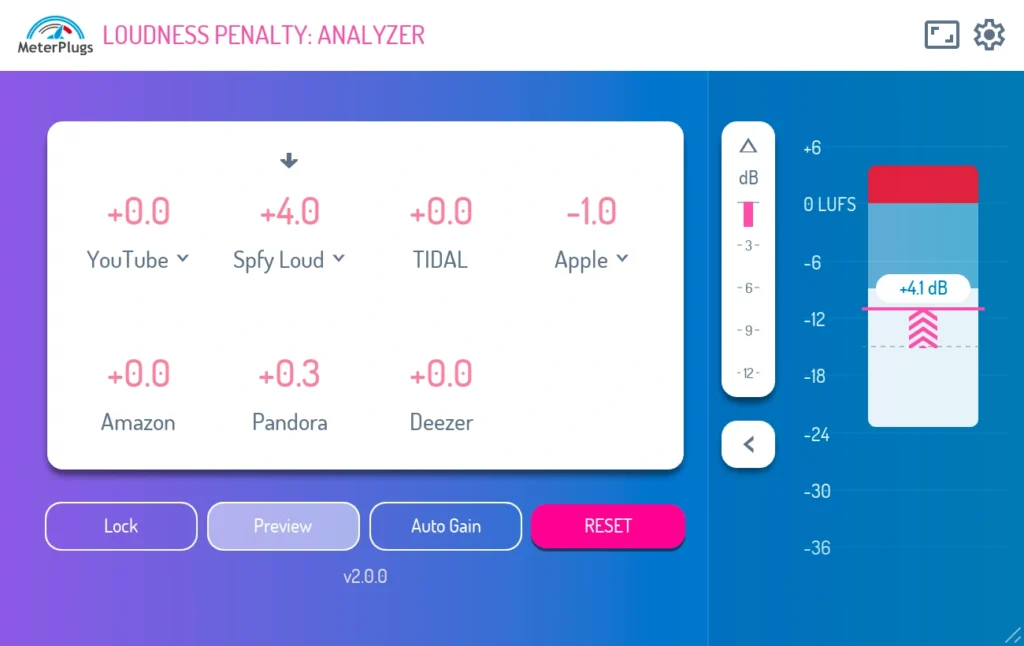
MeterPlugs “Loudness Penalty 2” visualizes how much each streaming service lowers the loudness of your track, and even reproduces the Spotify limiter. Check the current price on Plugin Boutique.
An upgrade version is also available for existing Loudness Penalty v1 owners.
2. What is MeterPlugs “Loudness Penalty 2”?
Loudness Penalty 2 is the major-update version of MeterPlugs’ staple loudness-check tool, “Loudness Penalty.” It is a plugin that lets you check in real time, right inside your DAW, how much your track will be turned down (i.e., how much “penalty” it receives) on online streaming services such as YouTube, Spotify, Apple Music, Amazon Music, TIDAL, Deezer, and Pandora. v2 adds new features such as the ability to reproduce the Spotify “Loud” mode limiter, and a Block View that lets you grasp true peak, integrated loudness, and loudness range at a glance.
The 5 New Features Added in v2
- NEW 01 — Spotify Loud Limiter Emulation: See and hear exactly what the “Loud” mode is removing from your track.
- NEW 02 — Real-time Block View: Grasp true peak, integrated loudness, and loudness range at a glance.
- NEW 03 — New Penalty Scores: Newly supports Spotify Quiet / Loud and YouTube Music scores.
- NEW 04 — Resizable UI: Includes a new compact list view that fits into any session.
- NEW 05 — Score Lock: Prevents the score from drifting after you’ve measured a track.
A Closer Look at the New Features
“Hear” the Impact of Spotify’s Limiter
When a Spotify user selects “Loud” in their volume settings, quieter tracks are turned up, and a limiter kicks in to prevent clipping. Until now, there was no way to hear what that limiter was actually doing to your track before uploading. Loudness Penalty 2 reproduces this limiter in Preview mode and displays the gain reduction in real time. Press the delta button to monitor only the audio being removed, so you can decide whether you’re satisfied with the result before listeners ever hit play.
See the Full Loudness Picture in Real Time
The new Block View displays your track’s maximum true peak, integrated loudness, and loudness range in real time. In Preview mode, you can also see how each streaming service adjusts the track’s gain and how that affects overall loudness. Will the peaks be clipped? Will the track be turned up or down? — the Block View shows it all at a glance.
A UI That Fits Any Session
Switch freely from a full mastering view to a compact single-strip display. Resize by dragging the corners, or pick a preset from the size menu in the header. The new compact list view narrows the UI down to a single column — small enough to sit next to the session you’re working on, while still showing the numbers you need.
Accurate Feedback — Without Relying on a Target LUFS
Aiming for a specific number like “upload at -14 LUFS” rarely produces the results you’d expect. Loudness Penalty gives you accurate feedback and lets you preview the result, so you can optimize and upload your track without guesswork or trial and error.
3. Loudness Penalty 2 vs. the Old Version (v1)
v2 adds the following features over the old version.
| Item | What was added / enhanced in Loudness Penalty 2 |
|---|---|
| Spotify Loud limiter reproduction | See and hear exactly what “Loud” mode removes (delta preview supported). |
| Block View | Real-time display of maximum true peak, integrated loudness, and loudness range. |
| Penalty Scores | Newly supports Spotify Quiet / Loud and YouTube Music scores. |
| UI / Display | Fully resizable, responsive UI plus a compact list view. |
| Score Lock | Lock the score after measuring so it won’t drift. |
💡 An upgrade version is also available for users who already own Loudness Penalty v1.
Supported Streaming Services
- YouTube
- Spotify
- Apple Music
- Amazon Music
- TIDAL
- Deezer
- Pandora
Main Features
- Real-time Loudness Penalty score display.
- Real-time Block View (maximum true peak / integrated loudness / loudness range).
- Supports major streaming services: YouTube, Spotify, Apple Music, Amazon Music, TIDAL, Deezer, Pandora.
- Supports Spotify’s Quiet / Normal / Loud modes.
- YouTube Music mode and YouTube Video mode.
- Spotify Loud limiter emulation (delta preview supported).
- Fully resizable, responsive UI including a compact list view.
- Lock button to freeze your measured values.
- Discover when you can turn the volume up without incurring a penalty.
- Preview how your track will sound online without leaving your DAW.
- Faster-than-real-time processing in Pro Tools AudioSuite.
System Requirements
- Supported formats: AAX / AU / VST
- Mac: macOS 10.7 or later (64-bit Intel or Apple Silicon)
- Windows: Windows XP SP3 or later (32 / 64-bit)
That covers the latest sale information for Loudness Penalty 2.