


The Him DSP, the developer behind kick-drum synthesizers and analysis tools, is currently running a sale!
In this article, we cover the latest The Him DSP sale information along with an overview of each product.
This article is updated as new sales go live, so check back regularly.
1. The Him DSP Latest Sale Info
The Him DSP is currently running the following sale.
Ninja AB Release Sale: Until June 29, 2026
- Ninja AB — A next-generation reference tool that maps your reference track and your own mix onto the same loudness/dynamics scale, letting you compare them section by section in sync. Sale ends June 29, 2026. Check current price on Plugin Boutique.
On Audio Plugin Deals, Plugin Boutique and ADSR Sounds, buyers also receive free bonus extras with their purchase.
2. The Him DSP Product Lineup (Including On-Sale Items)
The Him DSP develops three tools that cover different stages of the music production workflow: Kick Ninja for creating kicks, Sub Ninja for visualizing the low end, and Ninja AB for comparing tracks.
Kick Ninja — Next Level Kicks (Create Kicks)
In a nutshell: a kick synthesizer that gives you complete control over every element of your kick drum. Its AI feature can load any kick sample and recreate your favorite kicks.
The 4 Pillars
- AI Import — Convert any kick sample into a new preset.
- Pitch Snap & Tracking — Snap to notes and tune by following MIDI.
- Sample Layers — Add attack and texture across 3 layers.
- Phase Lock & Time Skew — Edit while keeping the tail phase locked.
Main Features
- Powerful anti-aliased oscillators — blend a pure sine with a selectable waveform and a harmonic oscillator.
- Sample-accurate automation (28 envelopes) with custom tension curves for total freedom.
- AI Import: convert any kick sample into a new preset to recreate and modify.
- Snap to notes and follow MIDI. 16-voice polyphony, legato and glide.
- Phase Lock: keep the tail (decay) phase fixed while editing the start.
- Two fully oversampled FX sections (9 distortion types + compressor + automatable filters).
- Three sample layers (with high-pass/low-pass filters, pitch, amp envelope — all automatable).
- Drag & export as a sample, 2-click envelope auto-simplification, undo/redo, copy & paste of envelope points.
- Instant visual feedback, section ruler, extreme zoom, linear/log time display (with adjustable skew).
- Includes 70 presets.
Ninja AB — Reference Like a Pro (Compare Tracks)
In a nutshell: a reference tool that goes beyond simple A/B. It displays your project on the same “loudness & dynamics map” as your reference, letting you lock and compare both section by section (chorus vs. chorus, drop vs. drop).
3 Easy Steps
- 1. Capture — Insert it on your master and play. Your track lands on the same map as the reference.
- 2. Tag — Tag intro, chorus and other sections once. Saved to a sidecar file.
- 3. Compare — Turn Sync on and the reference automatically follows to the same section.
Main Features
- Live project capture: read your own master like a reference.
- Section tagging (metadata stored in a sidecar file; tag once and it stays).
- Section-synced referencing: compare chorus vs. chorus, drop vs. drop.
- Multiple link modes: section / BPM / project sync (compare different mixes too).
- Three overviews: multiband / RMS / waveform.
- Zoom from a single bar up to the full arrangement.
- RMS, K-14, K-20, VU and peak metering.
- Automatic LUFS level matching across all references (avoids the “louder just sounds better” trap), with optional manual per-reference fine-tuning.
- Audition panel (high-pass / low-pass band filters).
- Stereo monitoring: L / R / Mid / Sides.
- Nine reference slots on the lower shelf.
Sub Ninja — Master Your Bass (Visualize the Low End)
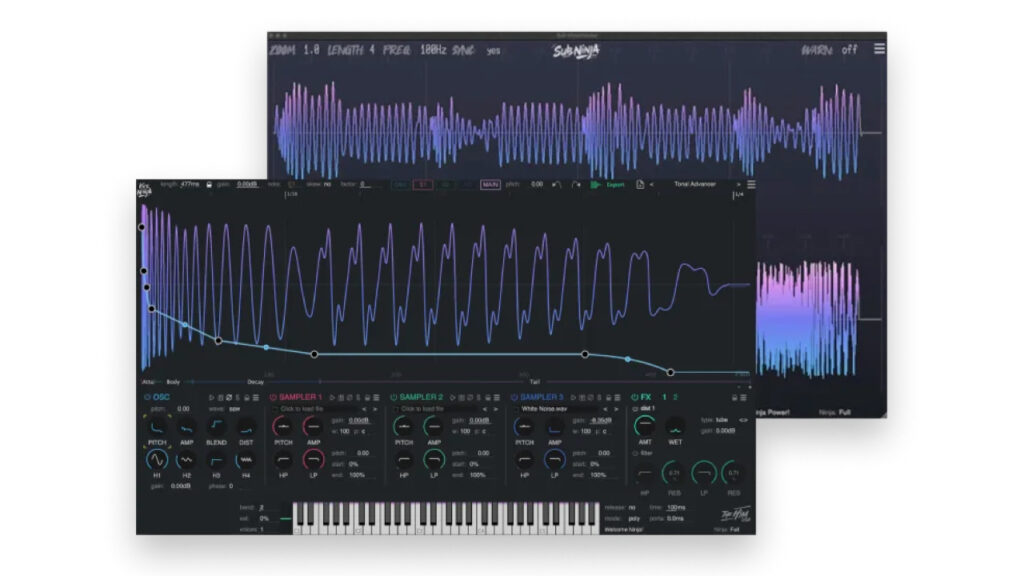
In a nutshell: a visualization tool that lets you dial in the mix of your sub/bass and kick by seeing it. It shows exactly what is happening in the low end, making a good mix easy.
Main Features
- Synced visualization: sync audio and waveform in real time to visualize your project’s low end.
- Waveform vs. spectrum: a waveform display that captures low-end levels better than a traditional spectrum analyzer.
- Instant filter control: adjust the low-pass filter on the fly. The waveform redraws instantly even during silence for precise tuning.
- Sidechain inputs: route individual channels to 4 independent sidechain inputs and visualize them wherever you like.
- Micro detail: zoom down to the sample level for outstanding clarity.
That covers the latest The Him DSP sale information. For the full The Him DSP lineup, check the brand page below.