

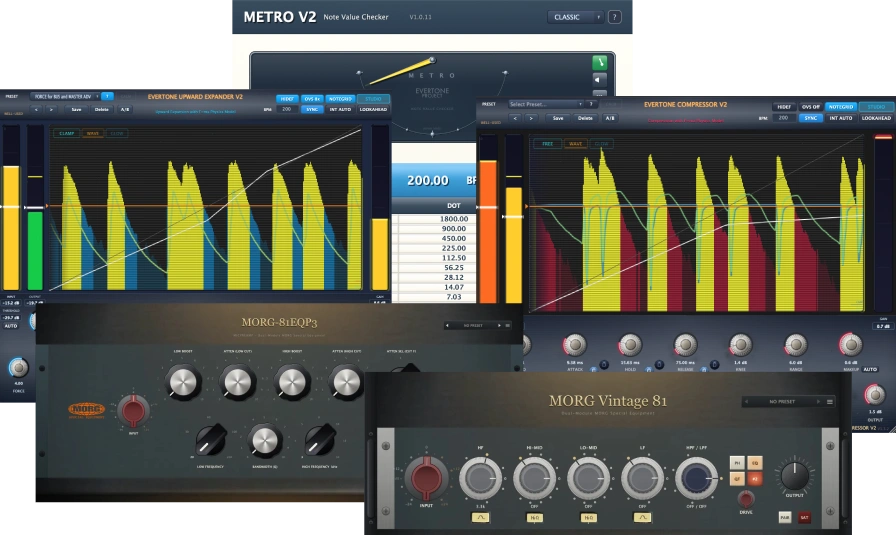


Evertone Project is running a sale on its physics-engine dynamics plugins and its hardware-captured vintage EQ plugins. Ending soon!
This article covers the latest Evertone Project sale along with an overview of each product.
We will keep updating this article as new sales begin, so be sure to bookmark it.
Latest Evertone Project Sale
Evertone Project products are currently on sale as follows.
MORG Series & Bundle Sale: Until November 2, 2026
Check current prices on Plugin Boutique. Buyers at Plugin Boutique, Audio Plugin Deals and ADSR Sounds may also receive free bonus plugins as purchase perks.
Evertone Project "MORG Vintage 81" – A 4-band vintage EQ/preamp modeled directly from two real units of a 1970s British console classic. (Sale ends 11/2)
Evertone Project "MORG Vintage 66" – A 3-band vintage EQ/preamp modeled from two real units, with fixed 10k HF and 5 MID positions. (Sale ends 11/2)
Evertone Project "MORG Vintage 84" – A 3-band vintage EQ/preamp modeled from two real units, with 3 HF positions, switchable hi-q MID and H.P./L.P. filters. (Sale ends 11/2)
Evertone Project "MORG-81 EQ" – A hardware-captured 3-band EQ plus H.P. preamp EQ driven by an 81-style amp, with the feel of the 66/73 family. (Sale ends 11/2)
Evertone Project "MORG-81 EQP3" – A hardware-captured passive EQ that can boost and cut at the same low frequency simultaneously. (Sale ends 11/2)
Evertone Project "Evertone Bundle v2" – A 5-product effects bundle: F=ma physics-engine Compressor v2 and Expander v2, the note-value calculator Metro v2, plus the MORG British console EQ and passive EQ. (Sale ends 11/2)
Evertone Project Product Lineup
Evertone Project is a Japan-based audio technology company that blends analog hardware craftsmanship with digital technology. Its lineup includes the dynamics plugins "EVERTONE PLUGINS V2" built around a proprietary physics engine that applies the law F=ma (force = mass x acceleration) to audio processing, the "MORG Series" of vintage gear captured from units still working in commercial studios, the one-knob "MAGICKNOB Series", and "Pro DeBleed", a bleed-removal tool for drums.
The products fall into four main lines.
- EVERTONE PLUGINS V2: F=ma physics-engine dynamics (Compressor v2 / Expander v2 / Metro v2)
- MORG Series: hardware-captured vintage EQ/preamps (Vintage 81 / 73 / 66 / 84, MORG-81 EQ, MORG-81 EQP3)
- MAGICKNOB Series: one-knob expander and compressor (Magicknob / Magicknob Red)
- Pro DeBleed: a dedicated bleed-removal tool for multitrack drums
EVERTONE PLUGINS V2 (Physics-Engine Dynamics)
Evertone Compressor v2
Evertone Compressor v2 is the second generation of a compressor that applies the physical law F=ma (force = mass x acceleration) to audio processing. It keeps the physics-based dynamics of V1 while the internal DSP has been completely rebuilt, adding up to x8 oversampling and a switchable high-precision "HiDEF" mode. It is designed as an uncompromising option not only for mixing and mastering but also for recording sessions and the stage.
The audio signal is treated as mass, and an acceleration component is applied to the electrical energy conversion, so the envelope follows the music naturally without crushing transients. In V2, HiDEF mode adds tight lows and clear highs, making it usable on everything from the master bus to the vocal bus in any genre.
What’s New in V2
- HiDEF mode: Unlocks x8 oversampling and makes the physics engine’s gain-curve calculation more precise. OFF is fully compatible with V1 and lighter on the CPU; ON follows the envelope more smoothly and reduces perceived distortion. It is ON for newly inserted instances, and opening a V1 session switches it to OFF automatically (preserving existing mixes exactly). It can only be switched while playback is stopped.
- Oversampling x4 / x8: Reduces the digital roughness that appears under heavy compression. x4 is available regardless of HiDEF, while x8 can only be selected with HiDEF ON. The small added latency is reported accurately to the DAW’s PDC.
- LIVE mode: Lightens UI drawing for stage, streaming and low-spec machines (audio processing is identical to STUDIO).
- DELTA: A button to monitor only the WET signal.
- For V1 users: The identification key is the same as V1, so V1 instances in Pro Tools, Logic, Cubase and others are automatically replaced with V2. The license is separate from V1; you obtain a V2 serial from the upgrade site using your V1 serial.
Physics Modes (4 Types)
Four physics modes with different acceleration characteristics are included.
- Standard: conventional standard compression and recovery
- F=ma Light: delicate, restrained processing with low acceleration
- F=ma Medium: balanced, general-purpose setting with moderate acceleration
- F=ma Heavy: powerful, dynamic processing with high acceleration
Main Parameters
| Parameter | Description |
|---|---|
| THRESHOLD | -60.0 to 0.0 dB. The level at which compression begins. |
| RATIO | 1.0 to 20.0:1. Higher values mean stronger gain reduction and a longer hold at peak level. |
| ATTACK / RELEASE / HOLD | 0.1-100.0 ms / 10.0-5000.0 ms / 0.0-300.0 ms. HOLD is a peak-hold function that holds the peak for a set time; lowering it to 0 gives Hold Bypass. |
| KNEE | 0.0 to 10.0 dB. Smaller values give a harder knee, larger values a softer knee. Double-click the center of the knob to pop it up; when KNEE enters its most effective range, the arc light glows (KNEE Glow Light). |
| RANGE | 0.0 to 40.0 dB. Limits the maximum amount of compression. Extends to 80 dB in EXTREME mode. |
| FORCE | 0.1 to 100.0 (up to 200 in EXTREME). The magnitude of the "force" in the physics calculation. 0.1-2.0 is delicate and natural, 2.0-10.0 gives active hits, and 10.0-100.0 gives strong to very strong hits. |
| DAMPING | 1 to 10000 (up to 20000 in EXTREME). The damping characteristic of the physical system. 1 is normal recovery; at 10000 the signal behaves like a high-bounce ball thrown at a hard floor and returns past its starting point. |
| BOX / AIR | Switches the release character. BOX is a mechanical, tight release (e.g. tight kicks); AIR is an open, breathing release (e.g. open snares). |
| EXTREME | Expands the range of FORCE, DAMPING and RANGE for deeper compression beyond the normal range and special textures. |
The recommended starting point is FORCE 1.00, DAMPING 1 and HOLD 0, which gives a response based purely on physical laws.
AUTO Functions and BPM Sync
- AUTO THRESHOLD / INTELLIGENCE AUTO: Automatically adjusts THRESHOLD so the amount of gain change approaches the value set in RANGE (INTELLIGENCE AUTO also adjusts RATIO when needed). It continues straight through to AUTO GAIN.
- AUTO GAIN: Analyzes input and output levels for about 5 seconds and sets WET TRIM to the optimal value.
- ASSIST (NORMAL / ADVANCED): Choose from two sets of recommended values for the current BPM and ATTACK, HOLD and RELEASE snap to them.
- NOTE GRID: Even with BPM SYNC off, the DAW’s BPM is tracked internally and ATTACK, HOLD and RELEASE switch to stepped note-grid values. Supports dotted (D) and triplet (T) values.
- TILT: -100% to +100%. Adjusts ATTACK, HOLD and RELEASE together relative to the adjacent reference note values.
- BPM TRACK: Automatically recalculates ATTACK / HOLD / RELEASE to keep the same note value when the DAW tempo changes (e.g. 300 ms at BPM 100 set as an eighth note becomes 150 ms automatically at BPM 200). You can also set BPM to FREE mode and automate it from the DAW.
Visuals, Sidechain and More
- Real-time waveform display: Shows the input waveform in yellow and the processed output curve as a green line. Switch between CLAMP / FREE, view curves at MIX 0% and 100%, and click the waveform to pause and inspect it.
- DEEP alert: A yellow "DEEP" indicator appears when THRESHOLD drops below -30 dB, and knobs and sliders turn red below -45 dB.
- Input meter / gain meter: Shows input level and gain change in dB, with a peak-hold toggle.
- HPF: A 0-300 Hz sidechain high-pass filter that prevents false triggering from large low-frequency energy.
- STB (Stability Control): 0-100. Controls multiple parameters with a single knob to tame unruly behavior at EXTREME settings.
- Safety: 0-100%. Automatically detects and suppresses fade-out-like effects or clipping caused by sudden gain changes.
- LOOKAHEAD: Natural processing using a look-ahead engine. On reports latency; off gives zero latency.
- UI modes: WELL-USED for a worn texture, CLEAN UP to return to factory condition, and CALM mode for long sessions.
- INPUT / OUTPUT / MAKEUP GAIN: -20 to +20 dB each. The knob color changes when the output clips. MIX balances dry and wet.
Evertone Expander v2
Evertone Expander v2 is the second generation of an upward expander that applies the F=ma law to audio processing. It lifts peak transients above the threshold to expand dynamic range and naturally restores the snap and attack that are often lost in recording. Like Compressor v2, the internal DSP has been completely rebuilt and it includes up to x8 oversampling and HiDEF mode.
In microphone recording, the signal arrives with the acceleration of its transients dampened or lost. A signal that has lost acceleration cannot drive speakers well, causing a flat sound image, a build-up of peak frequencies and masking. Evertone Expander v2 naturally restores the transient acceleration that should be there, fundamentally improving these problems and giving transients room for depth.
What’s New in V2
- HiDEF mode: Unlocks x8 oversampling and makes the physics engine’s gain-curve calculation more precise. ON gives smoother transient tracking. It is ON for new inserts and switches OFF automatically when a V1 session is opened.
- Oversampling x4 / x8: x8 can only be selected with HiDEF ON.
- LIVE mode: Lightens UI drawing (audio processing is identical to STUDIO).
- DELTA: Monitors only the WET signal.
- RANGE LINK: Links an increase in RANGE with a decrease in OUTPUT.
- For V1 users: V1 instances are replaced by V2 automatically, with HiDEF automatically OFF to preserve existing mixes. A V2-specific serial is required.
Physics Modes (4 Types)
As with Evertone Compressor v2, you can choose from four physics modes depending on the application: Standard, F=ma Light, F=ma Medium and F=ma Heavy.
Main Parameters
| Parameter | Description |
|---|---|
| THRESHOLD | -60.0 to 0.0 dB. The level at which expansion begins. |
| RATIO | 1.0 to 20.0:1. Higher values mean stronger expansion and a longer hold at the peak. |
| ATTACK / RELEASE / HOLD | 0.1-100.0 ms / 10.0-5000.0 ms / 0.0-300.0 ms (HOLD 0 gives Hold Bypass). |
| KNEE | 0.0 to 10.0 dB. Counter-clockwise makes the rise to the peak faster, clockwise makes it slower. Includes the KNEE Glow Light. |
| RANGE | 0.0 to 20.0 dB. Limits the maximum amount of expansion. |
| FORCE | 0.1 to 20.0. 0.1-2.0 is delicate and natural, 2.0-10.0 is active expansion, and 10.0-20.0 gives large dynamic changes. |
| DAMPING | 1 to 1000. 1 is normal damping; 1000 gives an instant cutoff. |
The recommended starting point is FORCE 1.00, DAMPING 1 and HOLD 0.
Other Features
- AUTO functions: AUTO THRESHOLD / INTELLIGENCE AUTO / AUTO GAIN (optimizes WET TRIM in about 5 seconds)
- BPM sync: ASSIST (NORMAL / ADVANCED), NOTE GRID (supports dotted and triplet values), TILT (-100% to +100%), BPM TRACK (follows tempo changes while keeping the note value)
- Visuals: Real-time waveform (input in yellow, output curve in green), CLAMP / FREE, DEEP alert (yellow below -30 dB, red below -45 dB, since going too deep on an upward expander gives a fade-in feel), GLOW, and mouse-wheel movement of the green line’s Y axis over the waveform window (double-click to reset)
- Sidechain and stabilization: HPF (0-300 Hz), STB (0-100), Safety (0-100%)
- LOOKAHEAD: On reports latency; off gives zero latency
- UI modes: WELL-USED / CLEAN UP, CALM, LIVE / STUDIO
- INPUT / OUTPUT / MAKEUP GAIN: -20 to +20 dB each, MIX 0-100%, BYPASS
Metro v2
Metro v2 is a utility plugin that calculates optimal parameters for expanders and compressors based on note values derived from BPM. By deriving note lengths from your song’s BPM and applying them to parameters, it turns timing adjustments that often rely on feel into clear numbers, letting you optimize the dynamics of the whole mix note by note. V2 adds tap tempo and a help mode.
What’s New in V2
- Tap Tempo: Turn on the TAP button and click the pendulum area to enter BPM (calculated from the average interval of the second and later taps, BPM 30-990, resets automatically after 3 seconds of no tapping). Turning TAP on automatically turns DAW SYNC off.
- Help Mode (?): Turn it on and hover over a control for 2 seconds to show an explanatory tooltip.
- PULSE FLOW SCOPE: A new display mode that can be switched with the pendulum meter. Over one cycle of the selected note value (1/1 to 1/512), a green beam draws one cycle of a sine wave across an LCD-style screen from left to right.
- Greatly improved CLASSIC theme texture: Gunmetal bezels, 3D polished chrome pivots, glass-panel cells and hairline finishes inspired by luxury watches.
- Fully compatible with V1 sessions: Projects saved in V1 open as they are (the V2 installer automatically uninstalls V1).
- EVERTONE V2 Bundle support: Shares a single license (EVT2 serial) with EXPANDER V2 / COMPRESSOR V2.
Main Features
- BPM input / SYNC: Enter BPM directly (30-990) or sync automatically to the host session’s BPM.
- Visual Note Meter: A pendulum-style meter swings left and right; a full swing equals a quarter note, and dot markers show the positions of eighth, sixteenth and thirty-second notes. Because you can see note values, it also helps when communicating with clients.
- ASSIST: Shows recommended values derived from BPM for three types: UPWARD EXPANDER / COMPRESSOR / GLUE COMPRESSOR. Two modes: NORMAL for processors without DRY/WET and ADVANCED for parallel processing.
- COPY: Click a value in the table to copy it to the OS clipboard automatically, then paste it straight into the target plugin’s parameter field.
- Pulse / Speed: Turn pulse signal playback on or off, and switch the pendulum and pulse speed between x0.5 / x1 / x2.
- Panic Mode: A bonus mode that drives the pendulum and pulse at the timing of the STANDARD column in the table rows, letting you experience playback timing at short note values and the limits of human perception.
- UI themes: Two themes: CLASSIC in blue-gray with gold accents, and LUXURY in jewel-like pink / gold / cyan. Your choice is saved with the session.
Evertone Bundle v2
Evertone Bundle v2, sold on Plugin Boutique, includes Evertone Expander v2, Evertone Compressor v2 and Metro v2, plus MORG Vintage 81 and MORG-81 EQP3 from the MORG Series. An upgrade version from V1 (Evertone Bundle v2 Upgrade from v1) is also available.
MORG Series (Hardware-Captured EQ / Preamps)
MORG Vintage 81 / 73 / 66 / 84
The MORG Vintage series consists of vintage EQ/preamp plugins captured directly from classic 1970s British consoles that are still in service in commercial recording studios. MORG (Yoshinori Kadogaki) measured only units he selected over more than 25 years, without correcting their characteristics and keeping the differences between individual units intact. The aim is the same experience as inserting the hardware itself.
Even among fully discrete vintage units of the same model number, each one sounds different. The everyday studio conversation of "both are great, but I prefer this module" is unique to this kind of gear. It is the accumulation of years of maintenance and the judgment of many engineers and artists that makes a unit an "individual", and the MORG Vintage series turns those individuals into plugins as they are.
Series Highlights
- Switch between two real units (#1 / #2): Two real units of the same model were each measured, and both the EQ and the preamp are stored as separate tables per unit. You choose by preference, not by ranking (on Vintage 73, #1 is the default by the owner’s preference).
- Characteristics are not rounded off: If there was an unacceptable difference, the hardware was serviced before capture, and the captured data is left untouched. The 1073 / 1066 HF has no OFF because the real units have no disconnect switch.
- Working gear in its working place: Units actually used on many productions in a commercial recording studio were measured as they are, in a western Japan, 60 Hz power environment.
- Accuracy: Error-prone steps such as input/output level management and setting mix-ups were automated with scripts and AI, and each plugin was verified one by one during capture. The difference between plugin and hardware is within the same range as the difference between two real units of the same model (null depth against hardware recordings of -28.6 to -33.5 dB, all 16 models). The median EQ difference from hardware is 0.04 dB, less than half of the 0.1 dB said to be the limit of audibility.
- Sweet spots as presets: Settings that match several parts are included as ready-to-use factory presets. User presets can be saved as well.
Common Controls
All four models share the same design; only the EQ configuration differs.
| Control | Description |
|---|---|
| INPUT / OUTPUT | -24 to +24 dB each. The input trim sets the signal level before the EQ and preamp; the output trim sets only the final volume without changing the amount of distortion. |
| EQ bands (dual knobs) | The outer ring is frequency and the inner ring is gain. Setting the outer ring to OFF removes that band from the circuit. Unity gain is at the 3 o’clock position (marked "0"). |
| Shelf / Peak, HiQ | Vintage 81 only. LF and HF switch between shelf and peak; the two mids have HiQ (raises Q to narrow the width). |
| H.P. / L.P. | High-pass / low-pass filters. OFF is at 12 o’clock, and frequency rises clockwise. The 81 and 84 have both; the 73 and 66 have H.P. only. |
| PH / EQ | Phase invert / EQ section on-off. The preamp stays in the signal path even with the EQ off, so you can compare just the effect of the EQ. |
| QT (Quality) | Calculation precision of the preamp: Full or Lite. Lite is a lighter, simplified version for when you need more tracks. |
| #1 / #2 | Switches between the two real units. The EQ and preamp were measured separately per unit, so the tonal tendency changes. |
| DRIVE | +/-12 dB. Changes the amount entering the preamp and cancels it afterward, so the volume barely changes and only the amount of distortion moves (volume variation within 0.2 dB across the full +/-12 dB range, within 0.8 dB even with SAT). |
| PAIR | A stereo pair that assigns #1 to L and #2 to R. The same state as setting up two real units in stereo (the EQ is common to left and right; only the preamp differs). |
| SAT | A saturation model that switches to a separate model captured with the hardware driven deeply into distortion. Combined with DRIVE, it sets the depth of distortion. |
| Presets | Step with the arrows and open the menu with the hamburger icon. Two kinds: factory and user. |
Differences Between Models
All frequencies follow the real panel markings, and the order of the mids matches the hardware.
| Item | Vintage 81 | Vintage 73 | Vintage 66 | Vintage 84 |
|---|---|---|---|---|
| Model | NEVE 1081 | NEVE 1073 | NEVE 1066 | NEVE 1084 |
| EQ bands | 4 | 3 | 3 | 3 |
| HF | 3.3k / 4.7k / 6.8k / 10k / 15k (shelf / peak switchable) | 12k fixed (shelf, no OFF) | 10k fixed (shelf, no OFF) | 16k / 12k / 10k (shelf) |
| HI-MID | 10 positions from 1.5k to 8.2k (HiQ switch) | – | – | – |
| MID | – | 0.36k / 0.7k / 1.6k / 3.2k / 4.8k / 7.2k | 7.0k / 3.8k / 2.4k / 1.2k / 0.7k (highest first, as on the hardware) | 0.35k / 0.7k / 1.6k / 3.2k / 4.8k / 7.2k (hi-q switch) |
| LO-MID | 10 positions from 220 to 1.2k (HiQ switch) | – | – | – |
| LF | 33 / 56 / 100 / 180 / 330 (shelf / peak switchable) | 35 / 60 / 110 / 220 (shelf) | 35 / 60 / 100 / 220 (shelf) | 35 / 60 / 110 / 220 (shelf) |
| H.P. | 27 / 47 / 82 / 150 / 270 | 50 / 80 / 160 / 300 | 45 / 70 / 160 / 360 | 45 / 70 / 160 / 360 |
| L.P. | 18k / 12k / 8.2k / 5.6k / 3.9k | None | None | 18k / 14k / 10k / 8k / 6k |
| EQ settings measured | 420 | 98 | 90 | 154 |
| Difference from hardware (median) | 0.05 dB | 0.04 dB | 0.04 dB | 0.03 dB |
The Vintage 84 has the same 3 bands as the 1073, with added HF frequency selection, a hi-q MID and an L.P. filter; the hardware is a 31102 unit converted to 1084 specification. The HF on the Vintage 73 and 66 has no OFF, so to keep it flat, return the gain to 0 (3 o’clock).
Note that the preamp stays in the path even when the EQ button is off, so to bypass completely, turn the plugin off in your host. The preamp runs internally at 48 kHz, so at other sample rates additional conversion latency is added (automatically compensated by the host).
MORG-81 EQ
MORG-81 EQ is a 3-band EQ plus H.P. that is driven by an 81-style amp while keeping the feel and frequency layout of the 66 / 73 family. It is one unit of the hardware-capture sister line "MORG / Ambience Series", co-developed by MORG and Ambience Sound Design, and two real units were measured so you can switch between #1 and #2. It also features a preamp that can be driven into deeper distortion than the MORG Vintage series.
The hardware is a single 2-channel unit, with frequency and variable controls on separate knobs side by side, just like the real thing. The EQ fits every setting of the hardware with 45 settings x 2 units.
EQ Configuration
- HF: 10 kHz fixed shelf. Gain only, with no OFF position (the hardware has no disconnect switch).
- MID: Bell at OFF / 700 / 1.2k / 1.6k / 2.4k / 3.2k. A pair of frequency and variable knobs.
- LF: Shelf at OFF / 35 / 60 / 110 / 220 Hz.
- H.P.: OFF / 27 / 47 / 82 / 150 / 300 Hz.
Controls such as INPUT / OUTPUT (+/-24 dB), PH, EQ in/out, QT (Full / Lite), #1 / #2, DRIVE (+/-12 dB), PAIR and SAT are shared with the MORG Vintage series. The license is separate from MORG-81 EQP3 and it is not included in the EVT2 bundle, so it must be purchased individually.
MORG-81 EQP3
MORG-81 EQP3 is a passive EQ with simultaneous boost/cut. Its key feature is that you can boost and cut at the same low frequency at once; raising both stacks the boost and the cut for a distinctive low end, which is this unit’s signature use. Because measuring each side separately and adding them cannot reproduce it, this is the only unit measured directly in its combined state (5,397 points per unit across two units, with a median difference from hardware of 0.052 / 0.047 dB).
The top row sets the amount and the bottom row sets frequency and width.
EQ Configuration
- LOW BOOST: 0-10, shelf. Frequency is selected with LOW FREQUENCY.
- ATTEN (LOW CUT): 0-10, bell. Acts at the same frequency as LOW BOOST.
- LOW FREQUENCY: 20 / 30 / 60 / 100 / 200 Hz. The frequency shared by the two controls above.
- HIGH BOOST: 0-10, bell. Frequency is set by HIGH FREQUENCY (3 / 4 / 5 / 8 / 10 / 12 / 16 kHz) and width by BANDWIDTH (SHARP 0-10 BROAD).
- ATTEN (HIGH CUT): 0-10, shelf. Has its own frequency, ATTEN SEL (3 / 4 / 6 / 8 / 10 kHz), separate from HIGH BOOST.
Because it is a passive EQ, even with every knob at 0 the sound still changes slightly from passing through the network. This is not a flaw but the heart of this type, and that state is measured as a setting too. When SAT is engaged, the level sent to the model is lowered by 12 dB internally so the DRIVE range stays in a usable zone. The license is separate from MORG-81 EQ, but it can be activated with the EVT2 bundle (Evertone Bundle v2) serial.
MAGICKNOB Series (One Knob)
Magicknob
Magicknob is a simple plugin that condenses the physics engine of Evertone Expander into a single knob. Complex processing can be controlled intuitively with one knob, making it ideal for quick sound design.
Knob Behavior
- 0-50% (blue arc light): transient energy enhancement
- 50-100% (green arc light): adds powerful energy to the whole signal
Magicknob Red
Magicknob Red is the compressor version, condensing the physics engine of Evertone Compressor into a single knob. Like Magicknob, it is intuitive with one knob and great for quick sound design.
Knob Behavior
- 0-50% (red arc light): transient rebound energy processing
- 50-100% (light orange arc light): powerful compression of the whole signal
A "Magicknob Bundle" that combines Magicknob and Magicknob Red is also available.
Pro DeBleed (Drum Bleed Removal)
Pro DeBleed is a dedicated bleed-removal tool for multitrack drums. Instead of cutting off bleed by volume like a conventional gate, it identifies and suppresses it by spectrum (frequency content) using NMF (non-negative matrix factorization) source separation. This preserves delicate nuances such as ghost notes and dynamics while removing only the unwanted bleed.
Its greatest strength is reaching territory a gate cannot. It suppresses hi-hat and cymbal spill in the snare mic without damaging the snare’s own sound. You can monitor in real time and dial in by hand, from aggressive processing that removes bleed thoroughly even at some cost to sound quality, to refined processing that separates naturally while preserving quality, so you can find the best balance for each use.
Workflow (5 Steps)
- Load: drag and drop your tracks
- Set instrument: specify the instrument such as snare, kick or overheads
- Analyze: analyze the whole group
- Dial in: fine-tune with the knobs and EQ
- Export: render the cleaned tracks
If you append a few drum one-shots to the end of each mic track, Pro DeBleed automatically detects that section and builds a "dictionary" specific to your drum kit, further improving separation accuracy (without one-shots it automatically falls back and separation still works).
Main Controls
- FOCUS / FINE TUNE: Two large red and blue knobs for intuitive control of separation strength and character (designed in the spirit of DRUMATOM 2).
- ATTACK / TILT / SMOOTH: Three mini knobs for fine-tuning transient retention, frequency balance and mask smoothness.
- 8-band interactive EQ: Visualize and adjust the amount of suppression per band. The SUPPRESSION meter shows at a glance where processing occurs.
- Waveform Bleed View: Overlays the removed bleed on the waveform in cyan.
- A/B comparison and presets: Compare, save and recall settings.
Stereo pairs are detected automatically, and sample rate and bit depth are preserved natively (no resampling and no loss of quality).
That is the latest on Evertone Project sales. Check the buttons below for the product lineup.